How to Redeem Defeat Anime RNG Codes: Screenshot Guide
Find the Codes box in Shop, follow a recorded Release redemption, and read the reward message with three credited gameplay screenshots.
Find Codes at the bottom of Shop
Open Shop, then scroll down until you reach Codes. The input sits below the Gold purchase cards in the gameplay shown here. Click or tap inside the dark rounded field beneath the Codes heading.
The three screenshots below come from GameWala’s video published September 7, 2026. They show the creator entering Release and receiving a success message. We reviewed these frames as an example of the process; this is not a redemption by our own account or a check that the code works today. Beebom and Pocket Tactics now both list Release as expired. Use the reported code tracker to see the current publisher claims before choosing an entry.
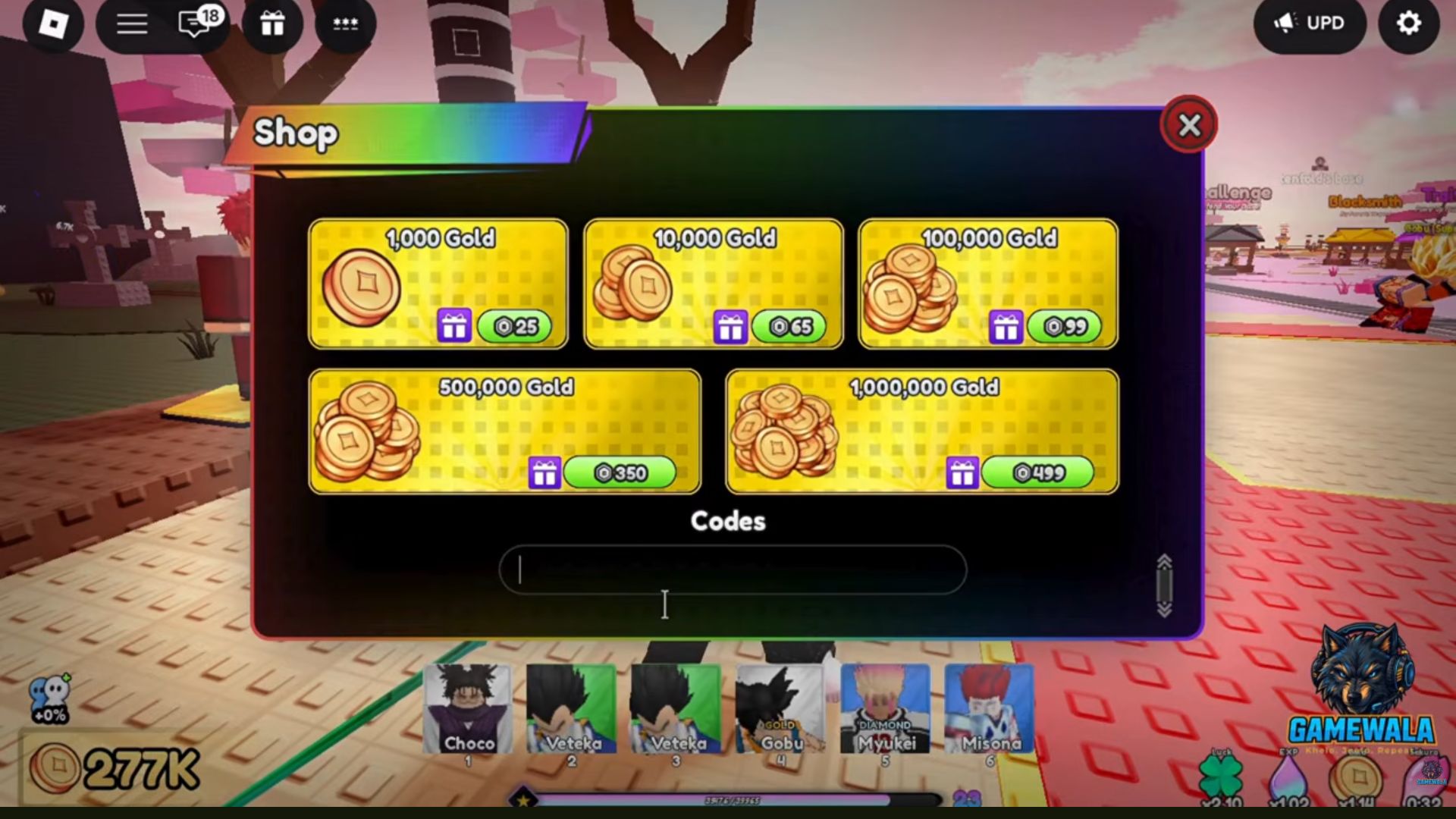
The green price buttons are for Gold purchases, not code submission. You do not need to press one to follow the redemption steps shown here. Use the separate Codes text field.
Enter the code, then submit
- Copy one entry from the codes page.
- Paste it into the Codes field without leading or trailing spaces. Preserve its spelling and capitalization.
- Press Enter to submit. Both Beebom and Pocket Tactics describe this keyboard step. A still screenshot cannot show which key was pressed.
In the example, the field contains Release with a capital R before the reward appears. It is the recorded example, not a recommendation to try that code based on newer publisher reports. Check the current code tracker for dated source classifications.
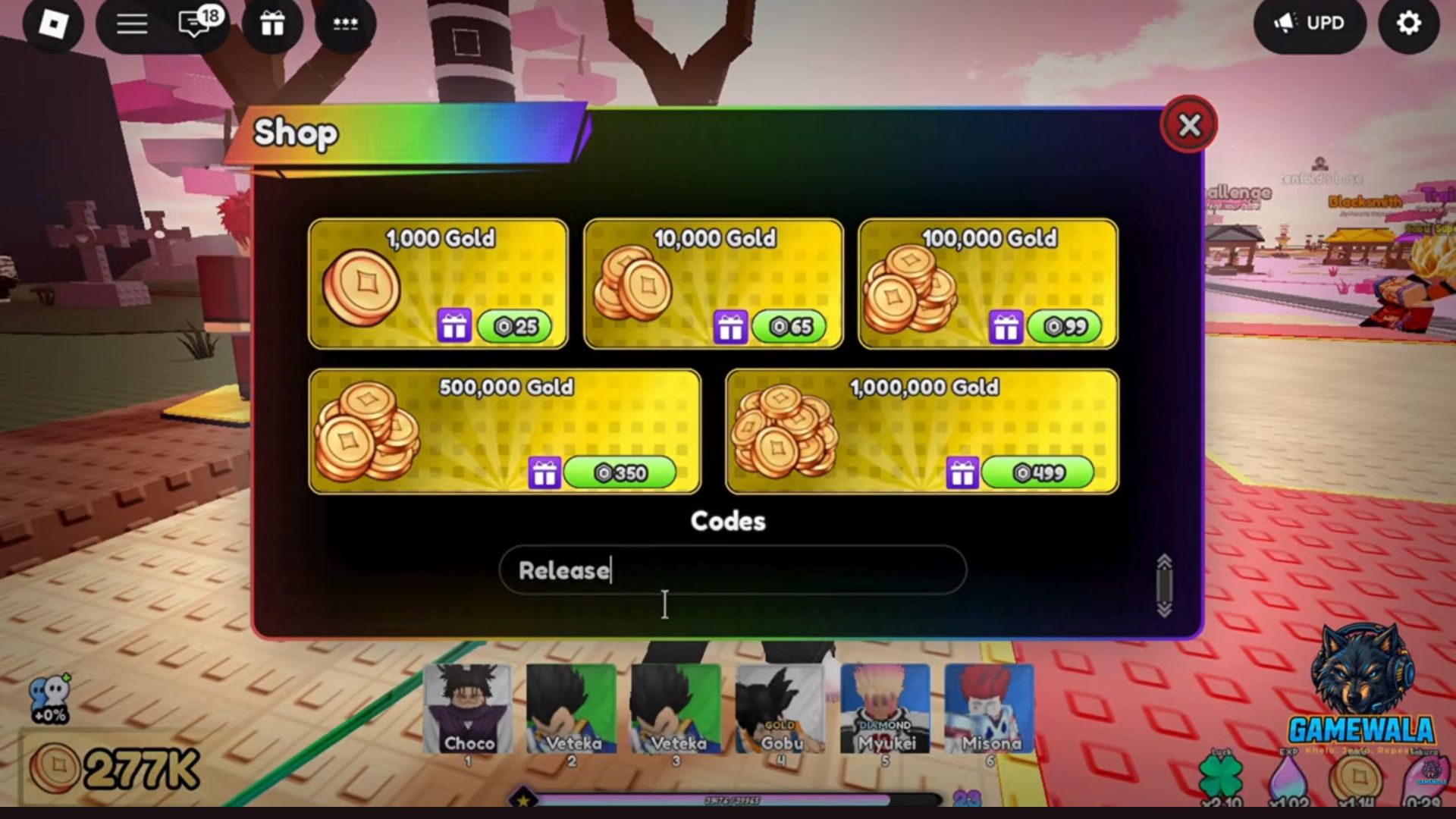
On a phone or console, use the submission control provided by the current game and your input device. These screenshots document the desktop interface; they do not establish a separate mobile or console button layout.
Read the game’s result
After submission, look for the game’s response. In this recording, the field clears and a message begins “Code redeemed!”, followed by the reward list. That message establishes a successful redemption in this specific recorded attempt.
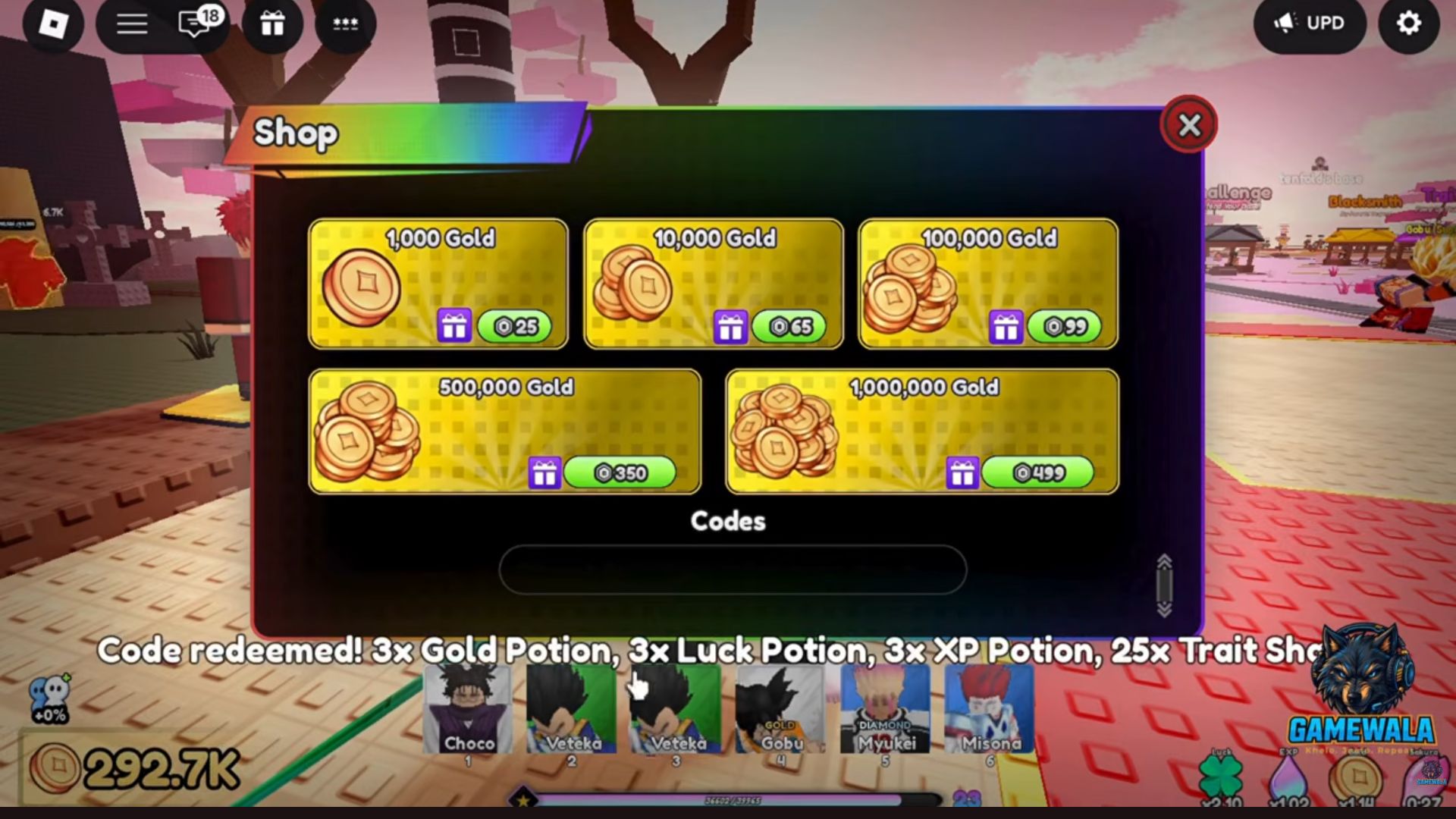
What does the Release example actually show?
| Reward | Evidence in this example |
|---|---|
| 3 Gold Potions | The success message visibly reads “3x Gold Potion.” |
| 3 Luck Potions | The success message visibly reads “3x Luck Potion.” |
| 3 XP Potions | The success message visibly reads “3x XP Potion.” |
| 25 Trait Shards | The frame shows “25x Trait Sha…” before the watermark obscures the ending. Earlier Beebom and Pocket Tactics reviews recorded the full reward; their current expired-only lists omit the reward text. |
The table describes this historical example and its supporting reports. It does not establish current rewards, expiry, potion duration or a new player’s access requirements. The resource guide explains the reported reward types separately.
If your attempt does not match the example
Read the exact response rather than retrying the same action without checking it.
| What happens | Next step |
|---|---|
| You cannot find Codes | Scroll to the bottom of Shop and check any access message. The screenshot is a reference for the recorded layout. |
| The game names an unlock requirement | Follow the current requirement. See the Death Castle guide for the reported gate and its evidence limits. |
| The game reports a previous redemption | Check whether that account already claimed the code. That result does not establish expiry for other players. |
| The code is rejected | Check spelling and surrounding spaces, then record the exact response. A rejection alone may not explain whether the cause is expiry, access or prior use. |
| A success message appears | Read the listed reward and check the relevant inventory or balance. Do not infer a reward from the code’s name alone. |
Do not buy a Gold offer because you mistake it for a redemption button. If the live interface differs, rely on its current labels and messages.
Sources and screenshot credits
- GameWala, “Defeat Anime RNG Codes || How to Redeem Codes in Defeat Anime RNG? / Gameplay / Guides /”, published September 7, 2026, duration 7:59. The cited gameplay sequence is 7:20–7:25, with the input populated at 7:23. The three images are frames from that gameplay, with the creator’s watermark preserved.
- Beebom codes guide, article updated October 6, 2026: supports the Enter submission step and the reported Death Castle prerequisite; it lists Release as expired. Its earlier version described the historical reward.
- Pocket Tactics codes guide, article updated October 6, 2026: supports the Enter submission step and lists Release as expired. Its earlier version described the historical reward.
- Sources and verification policy: how this site separates source reports, recorded examples and its own in-game tests.
The video publication date is not a verified recording date or game-version label. This article was assembled on September 20, 2026 and its publisher-source notes were reviewed on October 6, 2026. Neither date turns the older redemption into a current test.
FAQ
Where is the Codes box in Defeat Anime RNG?
Should I press a green Gold purchase button to redeem a code?
Do these screenshots prove Release works today?
Do I need to unlock Death Castle before using codes?
Related Articles
codes
Defeat Anime RNG Codes After UPD 9: Reports and Status
Compare 43 reported codes, Beebom’s UPD 9 coverage, conflicting UPD 8 and UPD 7 labels, and redemption evidence without game-tested claims.
guides
Defeat Anime RNG Sources, Verification and Corrections
See the official Roblox sources behind this Defeat Anime RNG guide, code-report dates, known data conflicts and our rules for corrections.
resources
Defeat Anime RNG Potions, Trait Shards and Trait Crystals
See recorded potion rewards, the Traits menu’s one-crystal Roll cost, and the difference between Trait Shard reports and the Trait Crystals label.
Was this helpful?
Thanks for the feedback!